
Vulnerability Assessment is a continuous activity that should be performed regularly because vulnerabilities in an IT environment continuously change due to software updates, application changes, or emerging cyber threats. Companies hire pen testers or they use vulnerability management tools to find and fix security gaps before hackers do, making their security stronger.
Free tools are useful for basic security needs, while paid tools offer advanced-level features and support. In this article, you will explore some of the best free and paid Vulnerability Management tools along with their key features, benefits, and ideal use cases
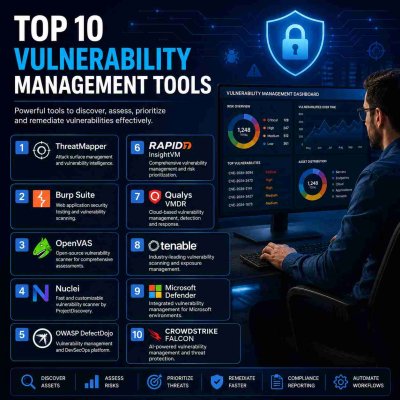
Top 10 Vulnerability Management Tools in 2026
| Tools | Free/Paid | Key Features | Benefits | Ideal use Cases | Limitations |
| ThreatMapper | Free (open source) | Agent-based and Agentless scanning, uses industry- standard CVE and CVSS data to detect and prioritize vulnerabilities, supports Docker, Kubernetes, and cloud infrastructure | Offers visibility into cloud-native applications and infrastructure. | DevSecOps, Docker, Kubernetes, and cloud security | Technical knowledge required |
| Burp Suite | Free & Paid | Manual web-based security testing. Crawl and audit modes, extensions, attack simulation | Useful for web application & penetration testing | Web app security testing, API testing | Free version has limited automation |
| OpenVAS | Free (open source) | Network vulnerability scanning, misconfiguration, and CVE detection | Cost-effective network vulnerability scanning | Network security of small & medium businesses | Advanced features require paid plans |
| Nuclei | Free (open source) | YAML templates, web, API & infrastructure scanning, CI/CD integration | Fast vulnerability scanning | DevSecOps, Bug bounty, continuous | Doesn’t provide the same depth as enterprise vulnerability |
| OWASP DefectDojo | Free (open source) | Centralizes findings from multiple scanners, removes duplicate findings | Reduces repetitive alerts and improves remediation | Security Teams | Relies on third-party scanners for findings |
| Rapid7 Insight VM | Paid | Asset discovery, vulnerability scanning, real-time dashboards, risk prioritization, remediation tracking | Prioritize critical vulnerabilities with detailed reporting | Enterprise Vulnerability Management | Commercial licensing can be high for large environments |
| Qualys VMDR | Paid | Asset discovery, TruRisk scoring, automated patching, cloud-native platform | Unified Vulnerability management & patching | Organizations with hybrid IT environment | Premium pricing and initial setup can be complex for new users |
| Tenable One | Paid | AI-powered exposure management, complex attack paths analysis, Compliance reporting | Provides enterprise-wide risk visibility & Compliance support | Compliance management | Expensive for small organizations |
| Microsoft Defender | Free & Paid | Antivirus, anti-phishing, endpoint protection, Microsoft ecosystem integration | Strong protection for Windows devices | Windows-based enterprises environments | Limited for Linux/macOS |
| CrowdStrike Falcon | Paid |
Cloud-native endpoint protection, real-time threat detection, single sensor, behavioural analytics |
Advanced incident response capabilities | SOC teams |
Require the core Falcon platform to function |
FAQ's
When should you use open-source vulnerability management tools?
Small businesses that have a limited budget and a limited IT infrastructure, or your business doesn't need continuous or ongoing testing and only wants basic security by identifying common vulnerabilities. Free tools are also useful for learners such as security professionals, students, and organizations evaluating security before making larger investments. In these situations, free tools can be used.
When should you use commercial vulnerability management tools?
Businesses or security teams can use paid vulnerability management tools when you have a requirement for faster remediation, continuous monitoring of frequent changes, or your business manages plenty of assets, or your business complies with ISO 27001, PI DSS, HIPAA, DPDPA, or SOC 2. Or your IT infrastructure expands across various platforms such as cloud, endpoints, containers, and applications.
Final Thoughts
The best tools aren't always the most expensive ones; choose tools that best fit your business needs and security goals.
Need help with this topic?
Our security experts can assess your specific situation and provide actionable recommendations.
Talk to an Expert