
What is the OWASP?
OWASP stands for the Open Worldwide Application Security Project; it is a non-profit organization that provides industry-focused security standards, controls, tools, documents, and guidance to improve the security of APIs, web applications, and software, and helps to ensure projects' long-term success.
It lists the top 10 critical security risks that should not be avoided. The ranking of each risk in the OWASP Top 10 is based on several factors, including:
1) frequency of vulnerability
2) new attack technique
3) new technology that introduces additional security risks.
4) technical impact and potential business impact of vulnerability
5)application testing methods and security assessment data
6) vulnerability exploitability and trends
7) feedback from community survey
Overall, OWASP gathers all the above information from in-depth research and expert assessment.
Why is the OWASP Top 10 important?
1) Developers know the key security risks to avoid when developing a new web application.
2) Pen testers and security testing teams use the OWASP Top 10 as a reference for identifying security risks.
3)Businesses can evaluate security risks and prioritise them so that smooth business operations are guaranteed.
4)OWASP Top 10 is the best resource for students and professionals to learn the fundamentals of web application security risks.
What Changed in the OWASP Top 10:2025?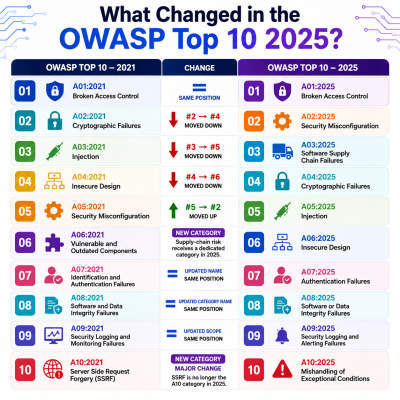
OWASP Top 10:2025 has introduced two new categories, significantly expanded one existing category, and several security risk categories have changed their ranking positions based on security data, expert analysis, and research.
What are the OWASP Top 10:2025 web application security risks?
A01:2025 Broken Access Control
Broken Access Control is very different from Authentication; Authentication tells us who you are, while Access Control determines what you can do and what permissions you have to take within the application.
A02:2025 Security Misconfiguration
Security Misconfiguration bursts the myth that not every security vulnerability is caused by coding errors; some can come from incorrect or insecure system configurations.
A03:2025 Software Supply Chain Failures
If you think software is made only from code, think again; building any software often involves many third-party libraries, pipelines, frameworks, APIs, tools, containers, and other dependencies. If any of these components is compromised or contains a security weakness, then software applications might be at risk.
Although Software Supply Chain Failures is a new category in the OWASP Top 10 2025, its roots go back to 2013 when it was introduced as “Using components with known vulnerability.” Today the scope has expanded to cover a much broader range of Software Supply Chain risks.
A04:2025 Cryptographic Failures
Cryptographic Failures are not limited to applications that have missing encryption. Cryptographic Failures also occur when encryption is implemented incorrectly, when encryption keys are leaked, or when the encryption method is weak or outdated; any of these issues could lead to a Cryptographic Failure.
A05:2025 Injection
Injection occurs when applications fail to take untrusted user input as normal data and instead execute it as a command or query. This practice gives attackers a chance to enter malicious input that can manipulate the application into executing unintended commands in a database, browser, operating system, or other interpreter.
A06:2025 Insecure Design
Insecure Design is not related to coding; the problem occurs when an application does not follow the business rules correctly or lacks effective security controls at the design level. For example, if you want to build a banking application, the code may run well, but you haven't decided beforehand how many transactions the user could do in a single day.
A07:2025 Authentication Failures
Don’t confuse authentication and authorization failures. In the 2025 edition, Identification and Authentication Failures were renamed to Authentication Failures.
Authentication failures occur when the application assumes the wrong person is a legitimate user and grants them legal permission to access systems or fails to protect login credentials/ sessions.
A08:2025 Software or Data Integrity Failures
In Software or Data Integrity Failures, without verifying beforehand, applications may trust software, updates, or plugins. For example, if an application downloads an update without checking whether it can be trusted, an attacker could exploit this by sending a malicious update that the application may automatically accept.
Proper verification is an important step in preventing these types of attacks.
A09:2025 Security Logging and Alerting Failures
Security Logging and Alerting Failures occur when applications lack proper mechanisms to handle suspicious activity.
For example, imagine somebody repeatedly trying to log in to a system using different passwords. If the application only shows a “login successful," or “login failed”, then the user may not realise that someone is trying to gain unauthorized access.
By having the proper Logging and Alerting mechanisms, the application can detect unusual activity and notify the user, such as:
“Multiple failed login attempts detected. This activity may be suspicious.”
So the user can be aware and can change their password, enable MFA, or contact a security team before the situation becomes a serious issue
A10:2025 Mishandling of Exceptional Conditions
Mishandling of Exceptional Conditions is one of the new categories introduced in the OWASP Top 10 2025. This risk occurs when applications detect an attack but do not know how to respond to or handle unexpected errors or situations. This incident can create a vulnerability in an application, putting it at greater risk of attack.
How can businesses reduce critical web security risks?
If you want to protect your business from security risks, you need to change the testing approach. Run automated scans along with manual testing, because automated scans alone may not be enough to identify every security weakness; manual testing helps uncover vulnerabilities that automated scanners may miss.
Businesses should also look to identify essential assets, understand potential attack paths, and conduct ongoing testing and monitoring of their business infrastructure; this helps them mitigate and manage web security risks early.
Need help with this topic?
Our security experts can assess your specific situation and provide actionable recommendations.
Talk to an Expert